


Heart Moments
4.7288.00 Reviews
App Specs
- Version
- 3.5
- Updated On
- License
- Free
- Downloads
- 500,000+
- Developer
- Creatunity
- Categories
- Music & Audio
- Platform
- Android
Screenshots

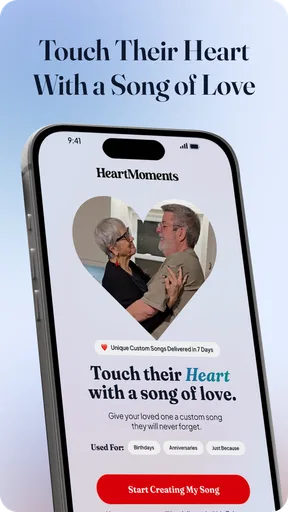
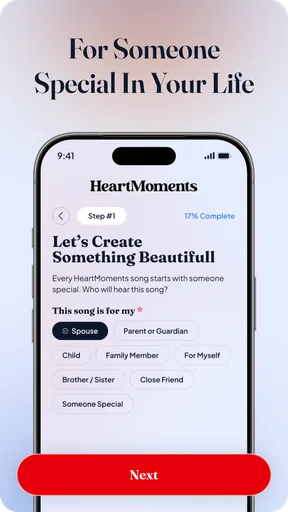
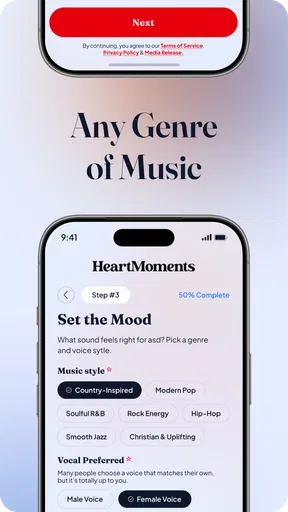
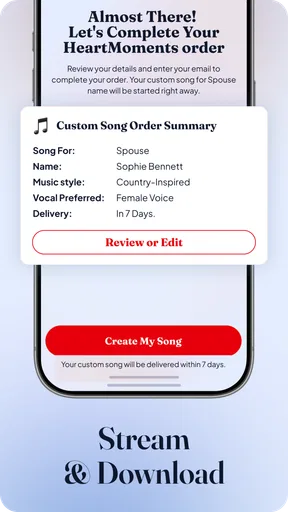
 Analysis by AppCompare
I’m drawn to memory apps when they help me do more than store pictures, and Heart Moments is built around turning personal recollections into crafted stories. That makes it appealing if you want photos, clips, and your own words to sit together rather than disappear into a camera roll. It also changes how I think about using it: the app feels most worthwhile when I take a little time to shape a memory, not when I’m simply trying to back up every image on my phone.
When a memory depends on a connection
Sharing is one of the moments when connectivity matters most. The app lets you send a link so friends or family can view a memory without installing it themselves, which is a practical advantage when the people you want to reach use different phones or don’t want another app. I’d treat link sharing as a deliberate step: choose the audience carefully, then check the result before sending it to a group chat.
That sharing route also makes a useful distinction between making a memory and showing it. I can prepare a story for myself first, then decide whether it belongs with selected people or a wider audience. If I’m somewhere with unreliable service, I’d avoid making the plan depend on sending the link immediately. I would finish the memory when convenient and share it later, rather than turning a special occasion into a troubleshooting session.
Using it in the middle of real life
The app’s collection of photos, video, notes, and voice recordings suits events where a single image misses the point: a family gathering, a milestone, or a day out with friends. A useful habit is to add a short note while the details are still fresh. A few words about who was there or why a moment mattered can be more valuable months later than a long caption written from memory.
For a realistic routine, imagine taking pictures during a weekend celebration, then making one moment afterward with a few carefully chosen images and a voice recording. That keeps the story personal without demanding that you edit every photo while everyone else is enjoying the event. I’d also create separate moments for distinct parts of a long day instead of forcing every scene into one oversized entry; smaller stories are easier to revisit and share with the right people.
Because the app brings personal media together, it’s worth thinking about what you select before adding it. A shared moment may include faces, background details, or a voice that other people didn’t expect to circulate. Privacy controls give you choices, but good judgment still matters: keep a sensitive memory private, and check the content before making it available to others.
What to do when the workflow gets interrupted
Travel and busy days rarely go perfectly. If you’re composing a story while moving between places, a battery warning, a weak connection, or a distraction can interrupt your attention even when the app itself is working normally. I’d capture the material with the phone’s camera first when the moment is fleeting, then assemble the story when I can focus. That approach prioritizes the event over the editing screen.
Worth Reading Before You Choose

EA SPORTS FC Mobile 26 Is a Bigger Football Game, but It Takes Time

Flipboard Shows What News Apps Must Do Beyond the Feed

Switching to Android Auto Means Rethinking Your Driving Routine

Google Calendar Makes a Crowded Week Easier to Manage

Ludo King Makes the Most of the Minutes Between Plans

Baby Panda World Brings Quick Play to Modern Phones, but Its Game Library Feels Busy
If a link does not reach someone as expected, first check whether the intended audience and sharing choice are right, then try sending it again when your connection is stable. For a memory that matters, it’s sensible to keep the original photos and videos in your usual personal storage as well. A storytelling app can make those files more meaningful, but it shouldn’t be the only place you rely on for irreplaceable originals.
Keeping the experience manageable
Heart Moments is a better fit for selected memories than for indiscriminate archiving. If you add everything, the effort of choosing, arranging, and writing can become a chore; if you reserve it for trips, celebrations, and small moments you genuinely want to revisit, the creative work has a clearer purpose. A simple approach is to make a moment at the end of an outing, choose only the media that carries the story, and add one detail you might otherwise forget.
It also helps to consider your data habits. Video and shared media can involve more transfer than a short note or a few photos, so I’d save the richer storytelling for a dependable connection if mobile data is limited. When you’re out, take the pictures you need and postpone optional uploads or sharing until it suits your plan. That’s not a drawback unique to this app; it’s a sensible trade-off whenever personal media is involved.
If you mainly want automatic photo backup, a conventional gallery or cloud-storage service is likely a better match: those tools focus on keeping and finding files, while this app emphasizes composing memories. If you want a polished video montage with precise control over cuts and sound, a dedicated video editor is the more natural choice. Heart Moments sits between those approaches, aiming for a personal keepsake rather than a full archive or production suite.
The app is free to download, with in-app purchases listed at $9.99 per item. It’s a music and audio app from Creatunity, rated for Everyone, and its current version is 2.9. It has a 4.7 average from around 1,700 ratings, with 121 written reviews, and has passed 100,000 installs. It was released on January 28, 2026, and requires Android 8.0 or later. Those figures suggest an established audience, but I’d still judge it by whether its storytelling approach suits the way you personally keep memories.
Getting Started with Heart Moments
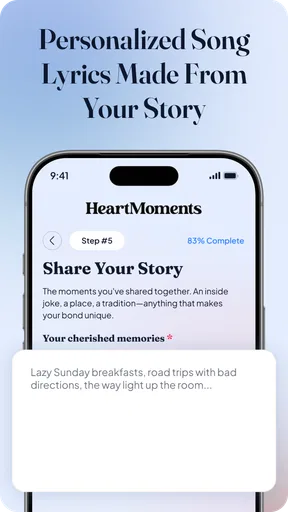
When I first downloaded Heart Moments, I was immediately struck by its sleek and intuitive design. The user interface is clean, which makes navigating through the app a breeze. Upon launching it, you're greeted with a simple setup process. You’re asked to create an account or log in via social media, which is pretty standard these days.
After logging in, you can start by creating your first "moment." This is where the app gets creative. You can combine photos, videos, and even add notes or voice recordings to create a rich tapestry of memories. It’s like building a story, and the app gives you all the tools you need to make it as detailed as you want.
Features That Stand Out
One of my favorite features is the timeline view. It allows you to see all your captured moments in chronological order. This is perfect for looking back at a trip or a significant period in your life. It’s almost like flipping through a digital photo album, but with so much more depth.
Another neat feature is the ability to share your moments with friends and family. You can send them a link, and they can view your beautifully crafted memories without needing the app themselves. It's perfect for sharing those special moments with loved ones who are far away.
I also appreciated the privacy settings. Heart Moments allows you to keep certain memories private, share them with select people, or make them public. It’s all about giving you control over who sees your content.
Creating a Moment
Let’s talk about creating a moment, shall we? The app makes it super easy to select media from your device. You can choose photos, videos, and even add some background music to give it that extra touch. There are filters and editing tools available too, which is great for those of us who like to add a little flair to our photos.
Once you’ve added your media, you can write a little note about what the moment meant to you. This is where the app really shines. It encourages you to reflect on your experiences and document your thoughts. It’s not just about the visuals; it’s about the feelings and stories behind them.
Using Heart Moments for Travel
As someone who loves to travel, Heart Moments is a dream come true. I recently took a trip and used the app to document every part of the journey. From the bustling streets of Tokyo to the serene beaches of Bali, I captured it all. The app allowed me to organize these moments into a single cohesive story that I can revisit anytime.
The geotagging feature is especially useful here. It automatically adds location data to your moments, which is perfect for remembering exactly where you were when you took that stunning sunset photo.
Final Thoughts
Overall, I’ve had a fantastic experience with Heart Moments. It’s more than just a photo album; it’s a way to relive your best memories over and over again. Whether you’re documenting a trip, a special event, or just day-to-day life, this app makes it easy and enjoyable.
Sure, there’s always room for improvement—like maybe adding more customization options or enhancing the editing tools—but what’s already available is pretty impressive. If you’re someone who loves capturing and revisiting memories, I’d definitely recommend giving it a try. It’s like having a little piece of your heart in your pocket wherever you go.
Pros
- Intuitive user interface for easy navigation.
- Customizable reminders for daily reflections.
- In-depth analytics to track mood trends.
- Secure and private data handling.
- Offers guided journaling prompts.
Cons
- Limited free features without subscription.
- Occasional lag in loading new entries.
- Requires constant internet connection.
- Ads can be intrusive in the free version.
- No option for exporting data to PDF.
FAQs for Heart Moments
What is Heart Moments, and how does it work?
Heart Moments is a mindfulness and meditation app designed to help users reduce stress and improve overall well-being. It offers guided meditation sessions, breathing exercises, and daily motivational content. The app uses a personalized approach, adapting to user preferences and progress to enhance the experience, making mindfulness accessible for everyone.
Is Heart Moments free to use?
Heart Moments offers a free version with limited features, while a premium subscription unlocks additional content and advanced features. The premium version provides access to an extensive library of meditation sessions, personalized coaching, and offline capabilities. Users can choose a subscription model that suits their needs, with options for monthly or annual payments.
What devices are compatible with Heart Moments?
Heart Moments is available on both Android and iOS devices, ensuring compatibility with most smartphones and tablets. The app is optimized for various screen sizes, offering a seamless experience across different platforms. Users should ensure their device meets the minimum operating system requirements for smooth functionality and updates.
How can Heart Moments improve my mental health?
Heart Moments offers scientifically-backed mindfulness techniques aimed at reducing stress, improving focus, and enhancing emotional well-being. Regular use helps users cultivate a calmer mind, better manage anxiety, and develop a more positive outlook. The app's personalized approach ensures that each session is tailored to individual needs and progress.
Is Heart Moments suitable for beginners?
Yes, Heart Moments is designed with beginners in mind, offering easy-to-follow guided sessions that gradually introduce users to mindfulness practices. The app provides clear instructions and supportive features such as progress tracking and reminders, making it easy for newcomers to incorporate meditation into their daily routine.


